Stock Signals & AI Forecasts
- 4.4
- Rating
- 50.00K
- Installs
- Free
- Price
 Analysis by App-foxy
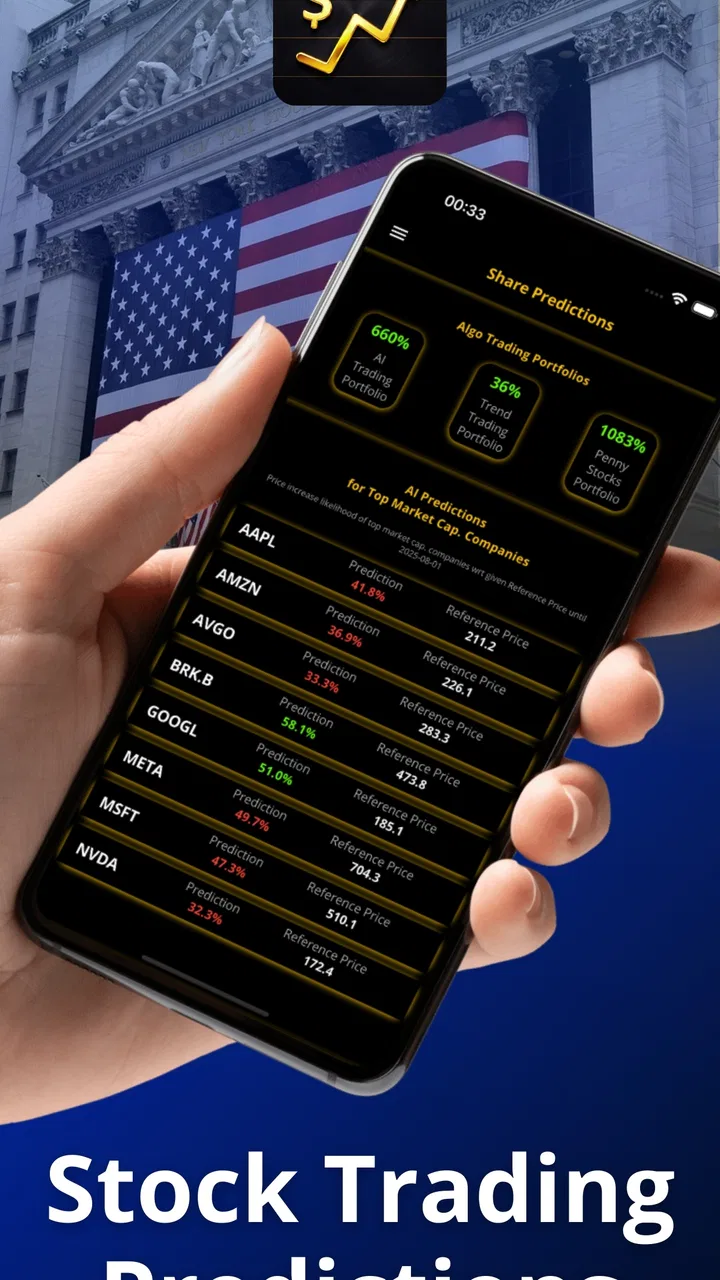
Stock Signals & AI Forecasts is a finance app for people who want to study market ideas without jumping straight into a broker’s order screen. I found its appeal in the combination of AI-assisted stock signals, portfolio simulations, and technical analysis tools. That makes it more useful as a learning and decision-support workspace than as a replacement for a regulated trading platform.
My first impression was that the app is aimed at users who enjoy looking for patterns but do not want to build every chart or calculation from scratch. It can help you turn a vague thought such as “I should watch this company” into a more organized process: inspect the available signal, review the technical picture, place the idea in a simulated portfolio, and then observe how your reasoning holds up. The most important mindset is to treat every signal as a prompt for research, not as an instruction to buy or sell.
From installation to a useful first session
The app is free to install, with optional in-app purchases ranging from $14.99 to $79.99 per item. It is suitable for Everyone, runs on Android 7.1 and later, and the current version is 2.2.53. Those details make it approachable for users with older Android devices, although the quality of your experience will still depend on how comfortably you can read charts on your particular screen.
You May Also Like

 Blood Strike: 2.5 Anniversary
Blood Strike’s Loadouts Turn Every Drop Into a Tactical Gamble
A close look at Blood Strike’s custom loadouts: how fast access to signature weapons reshapes its battle royale rhythm, rewards preparation, and narrows the gap between fights.

 Pandora - Music & Podcasts
Pandora’s Music Is Easy to Start, but Harder to Recover
Pandora’s strength is its low-effort path from a seed to a station. Its weak spot is how much confidence it asks you to place in connection, setup, and quiet recovery.

 8 Ball Pool
 Is Built on Rivalries, Rematches, and Routine
A close look at the rivalries, rematches, shared routines, and unanswered safety questions that turn a quick pool match into a persistent mobile community.

 Samsung Music
’s Quiet Strength Is Playing What You Already Own
Its reach comes less from spectacle than from dependable access to a personal library. That simplicity is both the app’s strongest retention engine and its ceiling.

 AccuWeather: Weather Radar
AccuWeather Review: A Quick, Clear Forecast for Everyday Decisions
For everyday plans, the best forecast is the one you can understand quickly. AccuWeather makes rain timing, radar, and local conditions easy to act on, with a few trade-offs.

 Hill Climb Racing
Why Hill Climb Racing Still Turns Crashes Into One More Run
A tiny car, a bumpy hill and one more upgrade: Hill Climb Racing keeps resurfacing because its simple chaos makes every near-miss feel personal.
More From Our News Desk



Stock Signals & AI Forecasts was released on June 11, 2022, and is developed by Loheden AI Solutions AB. Its audience has grown to over 50 thousand installs, while its average rating is 4.4 from roughly 756 ratings. I read that as a sign of solid interest rather than proof that the app will suit every investing style. Finance apps are especially personal: a beginner looking for structure may enjoy it, while an experienced trader wanting a full brokerage terminal may find it limited.
What to expect before you start
This is not the kind of app I would open expecting guaranteed predictions. The phrase “AI forecasts” can sound more certain than it really is, but market forecasting remains uncertain by nature. A signal can be useful because it draws attention to a possible setup; it cannot remove company risk, sudden news, broad market moves, or the possibility that a technical pattern fails.
I would approach the first session with one modest goal: learn how the app presents an idea and record your own reasoning around it. That goal is more realistic than trying to find a perfect pick immediately. It also lets you judge whether the interface helps you think clearly or encourages impulsive decisions.
The app makes the most sense for three groups. A newcomer can use the simulation side to practice forming a view without committing money. An intermediate investor can use signals as a second opinion alongside an existing watchlist. Someone interested in technical analysis can use the charting tools to compare a signal with their own reading of price movement.
It is less suitable for someone who wants direct order execution, detailed fundamental research, tax reporting, or a complete replacement for a brokerage account. A normal broker is the better destination when you are ready to place real trades, review account records, or manage actual holdings. A dedicated charting service may also be preferable if your priority is highly specialized drawing, indicator customization, or professional-grade market monitoring.
Setting up a sensible starting point
After installing it, I would resist the temptation to explore every signal at once. Start with a small watchlist or a few companies you already understand. Choosing familiar names gives you a reference point: you can compare what the app highlights with your own knowledge of the company and with the reasons you originally wanted to follow it.
Before acting on anything, decide what “success” means for this first test. For me, it would be being able to find a stock, understand the signal’s direction and context, inspect the related technical information, and place a simulated position with a written reason. That sequence is more valuable than simply tapping through several recommendations.
A useful habit is to separate observation from conviction. When you see a signal, write down what the app appears to be identifying, then write a second note explaining whether you agree and why. This small separation prevents the interface from becoming your entire decision process. It also creates a record you can revisit later when the simulated result changes.
If the app presents paid capabilities during setup or exploration, I would postpone purchasing until the free experience answers a basic question: does the presentation help you make better-organized decisions? The available purchase range is substantial enough that I would not pay merely because a feature sounds advanced. First understand the workflow, then decide whether the extra access solves a real problem for you.
Your first meaningful action
The clearest first exercise is to choose one familiar stock and inspect its signal alongside the technical analysis tools. Do not begin by asking whether the app is “right.” Instead, ask what the signal is actually contributing. Is it helping you notice a trend, a possible change in momentum, or a situation worth watching? The answer determines whether the app is giving you useful context or simply adding noise.
Next, create a simulated portfolio entry rather than moving immediately to real money elsewhere. Record the date, your reason for choosing the stock, and the condition that would make you reconsider the idea. Even if the app does not force you to write all of this, doing it yourself turns a passive forecast into a testable hypothesis.
This workflow has an overlooked advantage: it exposes timing mistakes. A prediction may look attractive in isolation, but the simulated entry lets you see how uncomfortable it would be to follow through after the market moves against you. It also helps distinguish a signal that was interesting before the move from one that remains useful after the opportunity has partly passed.
For an everyday example, imagine I am commuting home and notice that a company I already follow has appeared in the app’s signal area. I would not buy from my phone while distracted. I would save the idea for a quiet moment, inspect the chart, add a simulated position, and write down whether I am following the signal or my own research. Later, I can review the outcome without having mixed a rushed decision with real funds.
That is where the simulation feature becomes more than a decorative extra. It gives beginners a place to practice position sizing logic, patience, and review habits. It can also reveal whether someone enjoys technical decision-making at all. If you cannot explain why you entered a simulated position, the answer is probably not to purchase more tools; it is to slow down and learn the reasoning process.
Where new users can become confused
The first common confusion is treating an AI label as a probability of profit. I would read it as an analytical signal with limitations, not as a promise. The app’s value depends on how well you combine its output with your own time horizon, risk tolerance, and understanding of the company.
The second is assuming that a technical chart tells the whole story. Technical analysis can describe price behavior, but it does not automatically explain debt, competition, management decisions, product failures, or unexpected announcements. If your investment decision depends mainly on business quality, the app should sit beside fundamental research rather than replace it.
A third source of friction is the difference between a simulated portfolio and a real portfolio. A simulation can teach process, but it may not reproduce the emotional pressure of losing personal money, the practical details of execution, or the consequences of fees and taxes. I would use it as rehearsal, not as evidence that real trading will feel equally easy.
New users may also wonder whether they need to understand every technical indicator before using the app. In my view, no. Start with one or two concepts that you can explain in plain language. It is better to understand a small amount and keep a clear journal than to collect many signals without knowing how they relate to your decision.
Another practical question is whether the app is appropriate for a complete beginner. Yes, if the beginner treats it as an educational and simulated environment. No, if the expectation is that installation will produce an automatic investment plan. The app can organize attention, but it cannot decide your financial goals or determine how much loss you can afford.
Using the signals without surrendering judgment
I found the strongest workflow to be comparative rather than obedient. Look at the app’s signal, then compare it with the chart’s broader direction and with a separate explanation of the company. When all three point in the same direction, you still do not have certainty, but you do have a more disciplined basis for further research. When they disagree, that disagreement is useful: it tells you to investigate instead of rushing.
One non-obvious benefit is that the app can help you find weaknesses in your own habits. If you repeatedly open signals only after a stock has already moved sharply, you may be chasing attention rather than building a plan. If your simulated portfolio contains ideas with no exit condition, you may be collecting predictions rather than managing risk. The tool becomes valuable when it makes those habits visible.
I would also avoid judging the app after a single successful or unsuccessful forecast. One outcome says very little. A better test is to use the same process repeatedly, keep notes, and review whether the signals improved your research discipline. This is especially important because a lucky result can reward a poor method, while a failed idea can still have been well researched.
For users who already trade through another service, the app may work best as a separate analysis layer. Keep execution and account management with the broker you trust, while using this app for idea generation and simulation. That separation reduces the chance of making a real trade simply because an analytical screen made the opportunity feel immediate.
What to do after the first test
Once you have completed a simulated idea, the next step should be review rather than expansion. Look back at what you believed when you entered, what changed afterward, and whether the app helped you notice anything you would have missed. If the answer is yes, add another carefully chosen example. If the answer is no, change your process before adding more signals.
Paid options may be worthwhile for a user who has already identified a specific limitation in the free experience and expects to use the relevant tools regularly. They are harder to justify for someone who is still learning basic chart reading or who wants a complete financial plan. In that situation, educational material, a broker’s research section, or a simple spreadsheet may offer a clearer next step.
I would skip this app if you need guaranteed alerts, direct trading, comprehensive company analysis, or a portfolio service built around long-term financial planning. It is also not the right choice if you dislike interpreting charts and would rather follow a diversified, hands-off strategy. A broad investment service or financial adviser may fit that preference better than a signal-focused application.
On the other hand, I would recommend giving it a fair trial if you want a low-pressure way to practice market observation. The combination of signals, technical tools, and portfolio simulation creates a useful bridge between reading about trading and making structured decisions. The bridge works best when you cross it slowly.
Overall, Stock Signals & AI Forecasts is a focused finance app from Loheden AI Solutions AB that I would recommend as a research companion and practice environment, not as an automatic money-making machine. Its free entry point makes experimentation accessible, while the optional purchases mean you should evaluate the workflow before spending. Use the signal to begin a question, use the simulation to test your reasoning, and keep the final decision firmly in your own hands.
FAQs for Stock Signals & AI Forecasts
01What is Stock Signals & AI Forecasts?
Stock Signals & AI Forecasts is a market-analysis app designed to help users research stocks through trading signals, price forecasts, charts, and related financial information. It may use algorithmic or artificial-intelligence-based analysis to identify potential trends and opportunities. However, its predictions are estimates rather than guarantees, so users should verify information independently before making any investment decision.
02How accurate are the AI stock forecasts and signals?
The accuracy of Stock Signals & AI Forecasts can vary depending on market conditions, the stock being analyzed, the time frame, and the data used by the app. No forecasting system can reliably predict every price movement, particularly during breaking news or periods of high volatility. Treat signals as research tools, review the methodology where available, and never assume a forecast guarantees profit.
03Is Stock Signals & AI Forecasts suitable for beginners?
Beginners may find the app useful for exploring market terminology, monitoring stocks, and learning how technical signals and forecasts are presented. Nevertheless, new investors should understand basic concepts such as risk, diversification, volatility, and order types before acting on any recommendation. The app should support your research, not replace financial education or advice from a qualified professional.
04Does the app provide real-time stock data and trading alerts?
The availability and speed of market data, alerts, and signals may depend on the app version, selected market, subscription plan, and the data provider. Some information can be delayed, especially for certain exchanges or instruments. Before relying on an alert for a trade, check whether the quote is real time, review the applicable market hours, and confirm the price directly with your brokerage account.
05Can I trade stocks directly through Stock Signals & AI Forecasts?
Stock Signals & AI Forecasts is primarily intended for analysis, forecasts, and signals, rather than serving as a complete brokerage platform. Whether direct trading is available depends on the app’s current features and supported integrations. Users should confirm this in the app before downloading. If trading is not supported, you will need a separate regulated broker to place and manage orders.
Pros
- AI forecasts help identify potential market trends quickly.
- Signals cover multiple assets
- including stocks and cryptocurrencies.
- Clean interface makes market data easy to scan.
- Useful watchlists help monitor selected investments in one place.
- Alerts can notify you about new signals and forecast changes.
Cons
- Forecast accuracy can vary significantly during volatile markets.
- Some advanced signals or features may require a paid subscription.
- Delayed data could affect decisions when markets move rapidly.
- Signals are not personalized financial advice or guaranteed recommendations.
- Frequent alerts may encourage impulsive or excessive trading.

Stock Signals & AI Forecasts
Gallery